Category: Blogs

  • How WordPress Empowers Small Businesses to Thrive Online

    How WordPress Empowers Small Businesses to Thrive Online

    Table Of Content

    1. Introduction
    2. Cost-Effective Solution
    3. User-Friendly Interface
    4. Customizability and Flexibility
    5. SEO-Friendly Features
    6. Responsive Design
    7. Scalability
    8. Strong Community Support
    9. Content Management System (CMS)
    10. Security Features
    11. Conclusion

    Introduction

    In today’s digital age, having a robust online presence is crucial for small businesses aiming to reach a broader audience and grow their customer base. WordPress, a versatile and user-friendly platform, has emerged as a powerful tool for small businesses to build and maintain their online presence. Here’s how WordPress empowers small businesses to thrive online
    Cost-Effective Solution

    Starting a business often comes with budget constraints. WordPress offers a cost-effective solution for creating and maintaining a professional website. The platform itself is free, and there are numerous free themes and plugins available. Even premium options are generally affordable compared to custom website development.

    User-Friendly Interface

    Intuitive Dashboard: Easy-to-navigate dashboard for managing content, settings, and updates without technical expertise.
    Simplified Content Management: Drag-and-drop functionality and WYSIWYG (What You See Is What You Get) editor make content creation and editing straightforward.
    Accessible for Non-Techies: No coding skills required small business owners can efficiently handle their site’s day-to-day operations.

    Customizability and Flexibility

    Themes and Templates: Wide range of themes to choose from, allowing businesses to select or customize a design that reflects their brand identity.
    Plugins for Enhanced Functionality: Thousands of plugins available to add features such as contact forms, e-commerce options, and social media integration.
    Tailored Solutions: Ability to modify themes and plugins to meet specific business needs and preferences, ensuring a unique and functional website.

    SEO-Friendly Features

    Built-In SEO Best Practices: WordPress core is designed with SEO in mind, including clean URLs and structured data.
    SEO Plugins: Tools like Yoast SEO help optimize on-page elements such as meta tags, keywords, and readability for better search engine rankings.
    Content Management for SEO: Easy management of content and updates, which is crucial for maintaining and improving SEO performance over time.

    Responsive Design

    In an era where mobile internet usage surpasses desktop, having a mobile-friendly website is essential. Most WordPress themes are designed to be responsive, ensuring that websites look and function well on all devices, including smartphones and tablets.

    Scalability

    As a small business grows, so do its needs. WordPress is highly scalable, allowing businesses to start with a simple website and gradually add more features and functionalities as they expand. Whether adding a blog, an online store, or a booking system, WordPress can accommodate growing requirements seamlessly.

    Strong Community Support

    One of WordPress’s greatest strengths is its vibrant community. The platform has a large and active user base, including developers, designers, and enthusiasts who contribute to forums, create tutorials, and develop plugins and themes. This community support ensures that small businesses can always find help and resources when needed.

    Content Management System (CMS)

    At its core, WordPress is a powerful content management system (CMS) that makes it easy for businesses to publish and manage content. Regularly updating content is crucial for engaging visitors and improving SEO rankings, and WordPress simplifies this process with its user-friendly editor and media management tools.

    Security Features

    Security is a top concern for any online business. WordPress offers various security plugins and features to protect websites from threats and vulnerabilities. Regular updates and a proactive approach to security help ensure that small business websites remain safe and secure.

    Conclusion

    WordPress has revolutionized the way small businesses create and manage their online presence. Its cost-effectiveness, user-friendliness, customizability, and robust features make it an ideal platform for businesses looking to thrive in the digital landscape. By leveraging the power of WordPress, small businesses can build professional, scalable, and secure websites that attract and retain customers, driving growth and success.
  • Why WordPress is the Best CMS for Your Website

    Why WordPress is the Best CMS for Your Website

    When it comes to creating a business website, there are multiple reasons why WordPress is the ideal CMS. First and foremost, WordPress provides superior flexibility and customization possibilities, allowing businesses to develop distinctive and professional websites that are suited to their individual requirements. Its user-friendly interface makes it accessible even to individuals with no technical knowledge, and a wide library of plugins and themes opens up unlimited options for functionality and design.

    Table of Contents

    1. Introduction
    2. User-Friendly Interface
    3. Flexibility and Customization
    4. SEO-Friendly
    5. Large Community and Support
    6. Security Features
    7. Cost-Effectiveness
    8. Integration Capabilities
    9. Regular Updates and Improvements
    10. Conclusion

    Introduction

    WordPress developed as a blogging platform and has now grown to become one of the world’s most popular content management systems (CMS). Its wide set of features, flexibility, and ease of use make it a fantastic choice for creating websites of all sizes, from basic blogs to big e-commerce sites. WordPress is highly SEO-friendly, ensuring that your website can achieve better search engine rankings and attract more organic traffic. The platform’s strong community support and regular updates also mean that your website will remain secure and up-to-date with the latest features. Overall, WordPress stands out as the ideal choice for businesses looking to establish a robust online presence.

    User-Friendly Interface

    One of the most significant advantages of WordPress is its user-friendly interface, which makes it accessible to users of all skill levels.

    • Easy to Learn: The dashboard is intuitive and straightforward, allowing users to manage content, media, and settings with ease.
    • No Coding Required: You don’t need to be a web developer to create a beautiful website. WordPress’s visual editor, Gutenberg, allows you to create and edit pages using a block-based approach.
    • Media Management: Uploading and managing images, videos, and other media is simple with the built-in media library.
    • Extensive Documentation: There is comprehensive documentation available for WordPress, covering everything from installation to advanced customization.

    Flexibility and Customization

    WordPress provides unique flexibility and customization capabilities, making it ideal for almost any style of website.

    Themes: With thousands of free and premium themes available, you can choose a design that fits your brand and customize it to your liking. Themes respond to various industries and styles, ensuring that there is something for everyone.

    Plugins: Plugins are extensions that add functionality to your site. Whether you need an SEO tool, a contact form, an e-commerce solution, or social media integration, there is a plugin for almost every requirement. Plugins can be installed with just a few clicks, and many of them are free or affordable.

    Custom Code: For advanced users, WordPress allows the addition of custom CSS, HTML, and PHP code, enabling further customization and the creation of unique features tailored to specific needs.

    SEO-Friendly

    WordPress was developed with search engine optimization (SEO) in mind. Its clean code and structure allow search engines to browse and index your site more efficiently. Furthermore, various plugins, like as Yoast SEO, provide additional tools for optimizing your content, meta tags, and site structure, which improves your website’s visibility in search engines.

    Large Community and Support

    With a vast and active community, WordPress users benefit from extensive support. Whether you encounter a technical issue or need advice on best practices, you can find numerous forums, tutorials, and guides online. The WordPress community is known for its willingness to help newcomers and share knowledge.

    Security Features

    Security is a top priority for WordPress, and the platform includes numerous features to keep your site safe.

    • Regular Updates: WordPress core updates frequently include security patches to address vulnerabilities.
    • Security Plugins: Plugins like Wordfence and Sucuri offer advanced security features, including firewalls, malware scanning, and login protection.
    • Two-Factor Authentication: You can enable two-factor authentication to add an extra layer of security to your login process.
    • User Role Management: WordPress allows you to assign different roles and permissions to users, ensuring that only authorized personnel can make significant changes.

    Cost-Effectiveness

    Creating a website with WordPress can be very cost-effective. The platform itself is free, and there are many free themes and plugins available. Even premium options are generally affordable. This makes WordPress an excellent choice for small businesses, startups, and individuals on a budget.

    Integration Capabilities

    WordPress can integrate with a wide variety of third-party services and tools, enhancing its functionality.

    E-commerce Integration: Plugins like WooCommerce allow you to turn your WordPress site into a fully functional online store, complete with payment gateways, shipping options, and inventory management.

    Social Media Integration: Easily connect your website to social media platforms to share content and engage with your audience. Plugins are available to display social media feeds, share buttons, and more.

    Email Marketing: Integrate with email marketing services like MailChimp and Constant Contact to build and manage your email lists, create campaigns, and track performance.

    Regular Updates and Improvements

    WordPress is continuously being improved by a dedicated team of developers.

    Feature Updates: New features are regularly added to keep the platform current with the latest web standards and technologies.

    Security Patches: Regular security updates help protect your site from vulnerabilities, ensuring that your site remains secure.

    Community Contributions: The open-source nature of WordPress allows developers from around the world to contribute to its development. This collaborative effort results in a constantly evolving platform that adapts to the needs of its users.

    Conclusion

    WordPress stands out as the best CMS for your website due to its user-friendly interface, flexibility, SEO-friendliness, strong community support, robust security features, cost-effectiveness, integration capabilities, and regular updates. Whether you are a beginner or an experienced web developer, WordPress offers the tools and resources to create a successful and dynamic website. With its vast array of features and extensive support network, WordPress is an excellent choice for building and managing your website.

  • Exploring WordPress 6.6: What’s New and Exciting

    Exploring WordPress 6.6: What’s New and Exciting

    WordPress has always been a dynamic platform, continuously evolving to meet the needs of its vast user base. The latest major update, WordPress 6.6, is no exception, bringing a sack of new features and improvements designed to enhance creativity, usability, and efficiency. Whether you’re a casual blogger or a seasoned developer, there’s something in this update for everyone. Let’s dive into what’s new in WordPress 6.6 and how it can benefit your site.

    Table of Content

    1) The Basics

    2) Streamlined Site Editor Experience

    3) Unified Publishing Flow

    4) Custom Content with Synced Patterns

    5) Automatic Plugin Rollbacks

    6) New Design Elements

    7) Enhanced Block Bindings API

    8) Conclusion

    The Basics

    WordPress 6.6 is already rolling out on WordPress.com, and many of you might have already seen these new features in action. For those running their own WordPress installations, this update will soon be available. Remember, if you encounter any issues, WordPress.com’s expert Happiness Engineers are just a message away.

    Streamlined Site Editor Experience

    The Site Editor has undergone a significant overhaul in recent releases, and WordPress 6.6 takes this further by introducing a more intuitive side-by-side layout for editing pages. This new view improves navigation, making it easier to manage and edit your content. The integration of pattern management is also smoother, reducing the number of clicks needed to access your desired tools and settings. Additionally, enhancements in keyboard navigation and bulk editing actions contribute to a more efficient workflow.

    Unified Publishing Flow

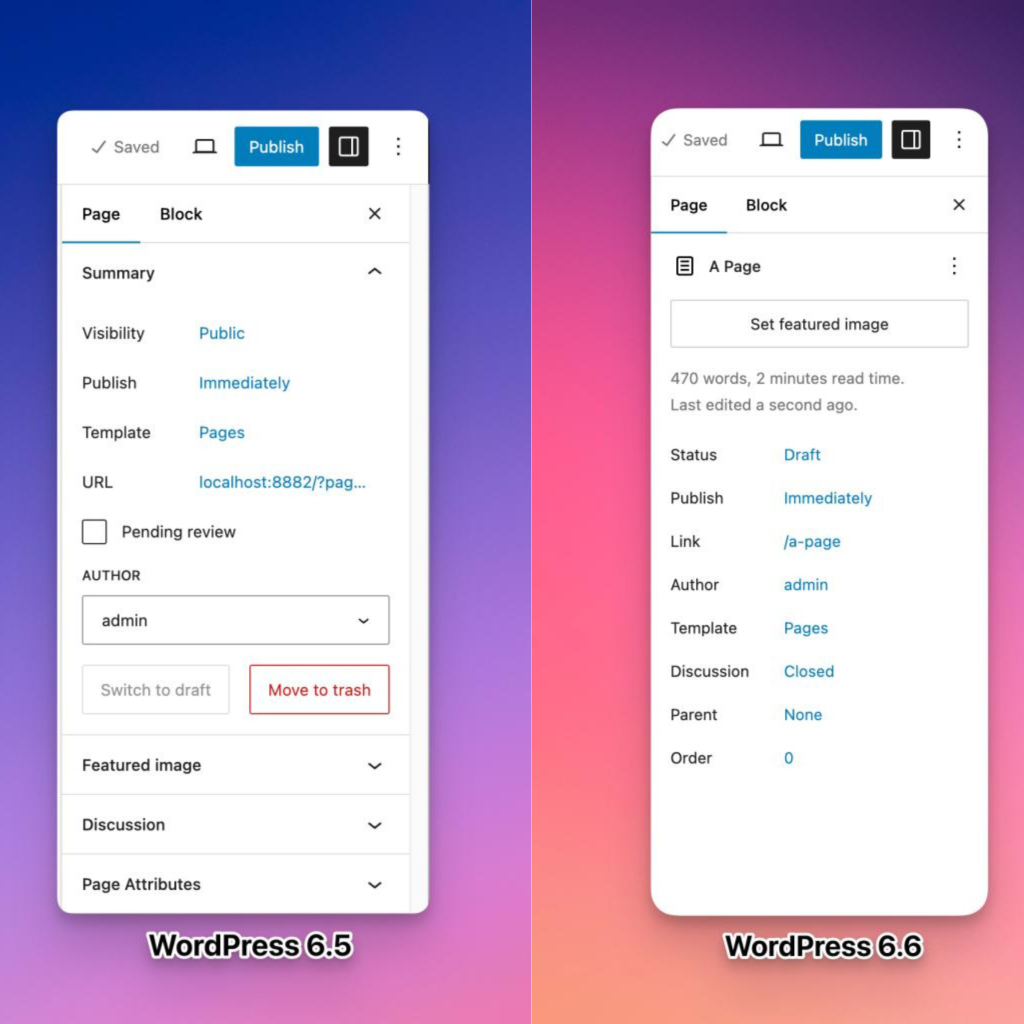
    Gone are the days of juggling between different interfaces for publishing posts and managing site content. WordPress 6.6 unifies the publishing flow, making interactions between different site elements much smoother. The updated layout now features more prominent displays for titles, publishing status, and featured images. For developers, this means an easier process for extending the editor, as both the post/page editor and Site Editor now share the same extensibility APIs. This not only streamlines development but also opens the door for more plugins to enhance your editing experience.

    Custom Content with Synced Patterns

    One of the most exciting new features is the ability to override synced patterns with custom content. This means you can now modify specific blocks within a pattern, such as changing the text or colors of a button CTA, while keeping the overall design consistent. You can enable these overrides from the “Advanced” section of various blocks like Paragraph, Heading, Buttons, and Image, with plans to expand this feature in the future.

    Automatic Plugin Rollbacks

    Plugin management just got a lot more reliable with automatic rollbacks. Previously, a failed plugin update could leave your site broken or parts of it non-functional. With WordPress 6.6, if an update fails, the plugin will automatically revert to its previous version, ensuring your site remains operational while you troubleshoot the issue.

    New Design Elements

    WordPress 6.6 introduces several new customization options to help you craft a visually appealing site:

    • Site Background Image: You can now set a site-wide background image with customizable size, position, and repetition options, allowing for a more personalized visual impact.
    • Negative Margins: For more precise design control, you can now set negative margins for any block. This feature facilitates overlapping elements and creative layouts, though negative values must be entered manually.
    • Grid Support: The new Grid and Grid Layout blocks let you create professional-looking grids for various types of content. The “Auto” option ensures responsive design, while the “Manual” option offers detailed control over rows and columns.
    • Custom Shadow Styles: From the Styles menu, you can now edit and create custom shadow styles for images, buttons, and more, giving you greater flexibility in your design.
    • Section-Specific Styles: Theme developers will appreciate the ability to define style variations for specific site sections, such as headers or footers. This feature requires editing the theme’s theme.json file but provides a powerful way to customize different parts of your site.

    Enhanced Block Bindings API

    The Block Bindings API, introduced in WordPress 6.5, has been upgraded for greater ease of use. This API allows you to connect the content of a block to custom field data. In WordPress 6.6, you can now update custom field data directly from the block editor, streamlining content management and making it easier to maintain data consistency across your site.

    Conclusion

    WordPress 6.6 is packed with features that enhance usability, creativity, and efficiency. Whether you’re looking to simplify your editing process, customize your site’s design, or ensure the reliability of your plugins, this update offers valuable tools and improvements. As always, keep an eye on the WordPress blog for more updates and tips, and happy WordPressing!

  •  How we built Reporters Club America Website

     How we built Reporters Club America Website

    Table of Content

    1) Introduction

    2) Development Process

       i) Planning and Requirement Analysis

       ii) Design and Prototype

       iii) Development

       iv) Integrating Plugins

       v) Testing

       vi) Deployment and Launch

    3) Conclusion

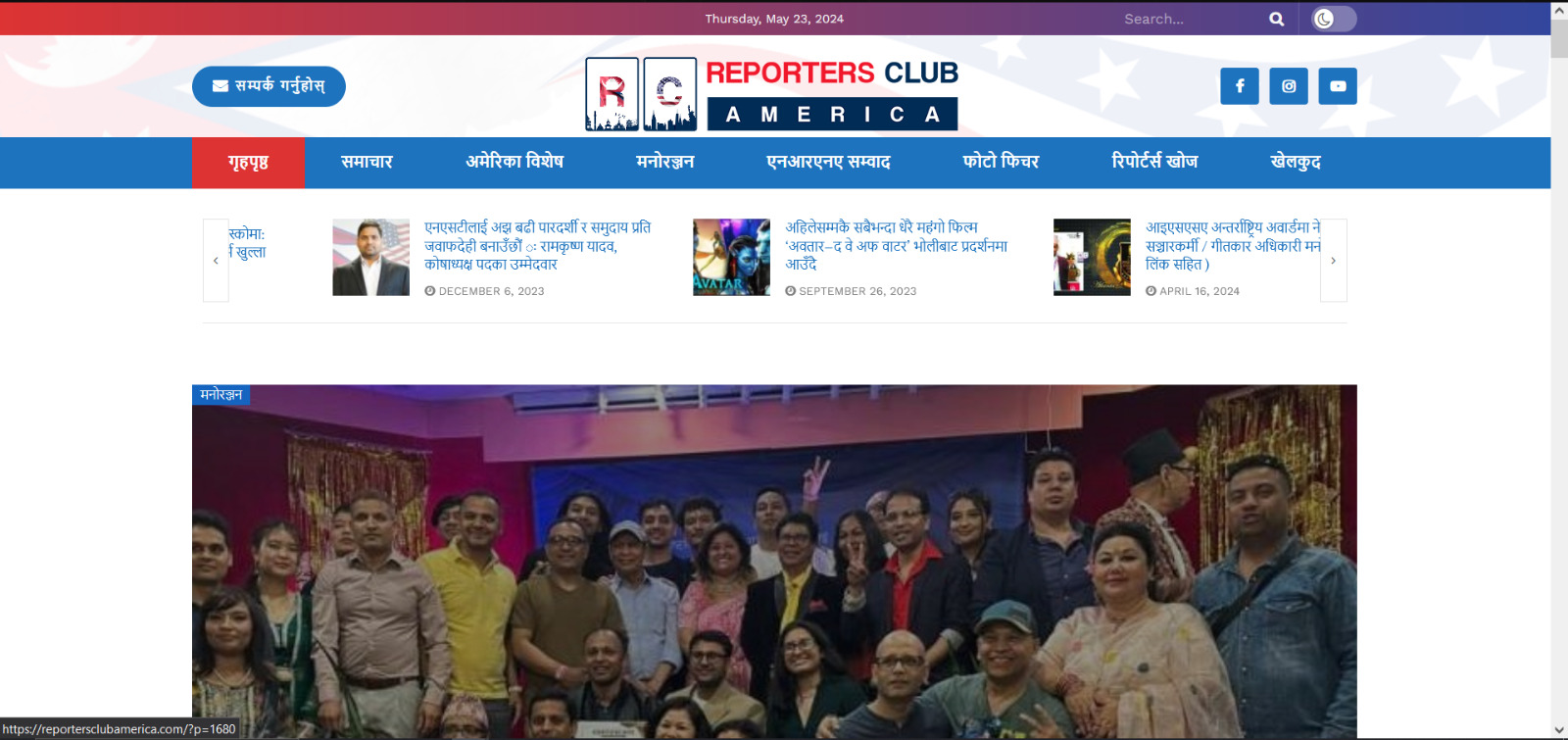
    Reporters Club America is an official platform that showcases news articles and blogs focusing on Nepal. Our goal was to create a website that is not only visually appealing but also functional and user-friendly. Utilizing WordPress and a range of plugins, we aimed to build a site that provides a seamless experience for readers and contributors alike.

    Our first step was to sit down with the Reporters Club America team to understand their vision and requirements for the website. Key objectives included:

    -A clean, professional design that reflects the journalistic integrity of the organization.

    -Easy navigation to access news articles, blogs, and categories.

    -Integration of SEO tools to enhance visibility.

    -Features for user engagement, including contact forms.

    With a clear understanding of the requirements, our design team began creating wireframes and prototypes. Using tools like Sketch and Adobe XD, we developed mockups that outlined the site’s layout and design. Key design elements included:

    -A homepage featuring the latest news and blog posts.

    -A categorized menu for easy navigation.

    -Responsive design to ensure compatibility with all devices.

    -Clean typography and a professional color scheme to enhance readability.

    Once the design was finalized, we moved on to the development phase. We chose WordPress for its flexibility and ease of use. The key development steps included:

    -Setting up a WordPress environment and installing the necessary plugins.

    -Customizing the JNews theme to match our design.

    -Creating custom post types for news articles and blogs.

    -Ensuring the site is mobile-friendly and fast-loading.

    To enhance the functionality and user experience of the website, we integrated several essential plugins:

    -JNews Theme: This theme was perfect for our needs, offering a range of features and customization options ideal for a news and blog site.

    -All in One SEO: To optimize the site for search engines, we used this powerful SEO plugin.

    -Contact Form 7: This plugin allowed us to create a user-friendly contact form for inquiries and feedback.

    -MC4WP: Mailchimp for WordPress: We integrated this plugin to manage newsletter sign-ups and email marketing.

    -Popup Box: Used for displaying popups for special announcements and promotions.

    -The Post Grid: This plugin enabled us to display posts in a grid layout, enhancing the visual appeal and organization of the content.

    Before launching, we conducted extensive testing to ensure everything worked perfectly. This involved:

    -Functionality Testing: Verifying that all features, including forms and popups, worked as intended.

    -Compatibility Testing: Ensuring the site performed well across various browsers and devices.

    -Performance Testing: Using tools like GTmetrix and Google PageSpeed Insights to optimize loading times and overall performance.

    -User Testing: Gathering feedback from a select group of users to identify and fix any usability issues.

    With testing complete, we moved on to the deployment phase. Key steps included:

    -Setting up the live hosting environment.

    -Migrating the website from the development environment to the live server.

    -Conducting a final round of testing on the live site.

    -Officially launching the site with announcements on Reporters Club America’s social media channels.

    Building the Reporters Club America website was a fulfilling project that combined creativity and technical skills. By leveraging WordPress and a suite of powerful plugins, we created a professional, user-friendly platform for news and blogs related to Nepal. We hope this walkthrough provides valuable insights into our development process and serves as inspiration for others embarking on similar projects.

    Visit Reporters Club America Website: https://reportersclubamerica.com

  • How we built Bob Records Website

    How we built Bob Records Website

    Table of Content

    1) Introduction

    2) Development Process

       i) Planning and Requirement Analysis

       ii) Design and Prototype

       iii) Development

       iv) Integrating Plugins

       v) Testing

       vi) Deployment and Launch

    3) Conclusion

    Bob Records is a portfolio website dedicated to showcasing the musical projects of GBOB, one of Nepal’s most renowned rappers. The site serves as a comprehensive hub for fans to explore his discography, watch videos, and stay updated with his latest releases. Built using WordPress technology, the site combines functionality with aesthetic appeal to provide an engaging user experience.

    The first step in our development process was thorough planning and requirement analysis. We sat down with GBOB and his team to understand their vision and goals for the website. Key requirements included:

    -A visually appealing design that reflects GBOB’s brand and musical style.

    -Easy navigation to access different musical projects.

    -Integration of multimedia elements such as audio and video.

    -SEO optimization to increase visibility.

    With a clear understanding of the requirements, our design team started working on the prototype. We chose a modern and bold design to match GBOB’s dynamic persona. Using tools like Adobe XD and Figma, we created wireframes and mockups that outlined the structure and layout of the website. Key design elements included:

    -A striking homepage with a hero section featuring GBOB’s latest release.

    -An intuitive menu for easy navigation.

    -Sections for albums, singles, music videos, and upcoming events.

    -A responsive design to ensure compatibility across all devices.

    After finalizing the design, we moved on to the development phase. We chose WordPress for its flexibility and ease of use, enabling us to create a powerful yet user-friendly site. Key steps included:

    -Setting up a WordPress environment and installing necessary plugins.

    -Customizing the Astra theme to align with our design.

    -Ensuring mobile responsiveness and fast loading times.

    To enhance the functionality and aesthetics of the website, we integrated several essential plugins:

    -Astra Theme: A lightweight and highly customizable theme, Astra provided the perfect foundation for our design.

    -Elementor: This drag-and-drop page builder allowed us to create complex layouts with ease, ensuring that the site was both beautiful and functional.

    -Preloader Plus: To improve user experience, we added Preloader Plus, which displays a loading animation while the site loads.

    -WPForms: For the contact form, we used WPForms, a powerful form builder plugin that enabled us to create a user-friendly booking and inquiry form.

    Before launching, rigorous testing was essential to ensure everything worked seamlessly. We conducted:

    -Functionality Testing: Checked all features, including audio players, video embeds, and the contact form.

    -Compatibility Testing: Ensured the site worked across various browsers and devices.

    -Performance Testing: Used tools like Google PageSpeed Insights to optimize loading times and overall performance.

    -User Testing: Gathered feedback from a select group of users to identify any usability issues and make necessary adjustments.

    Once testing was complete, we moved on to deployment. We migrated the site from our development environment to the live server. Key steps included:

    -Setting up the live hosting environment.

    -Migrating the database and files.

    -Conducting a final round of testing on the live site.

    -Officially launching the site with an announcement on GBOB’s social media channels.

    Building the Bob Records website for GBOB was a rewarding experience that combined creativity and technical expertise. By leveraging WordPress and a suite of powerful plugins, we were able to create a vibrant and engaging portfolio site that truly represents GBOB’s artistry. We hope this walkthrough provides valuable insights into our development process and inspires others embarking on similar projects.

    Visit Hamro Agent Website: https://bobrecords.com.np/

  • Ecommerce, Building website for your business

    Ecommerce, Building website for your business

    Table of Contents

    1. Introduction

    2. The Rise of Ecommerce

    3. Importance of an Ecommerce Website for Your Business

    4. Building your e-commerce site with wordpress

    5. Conclusion

    In today’s digital age, the significance of having an online presence for businesses cannot be overstated. With the exponential growth of ecommerce, consumers now prefer the convenience of shopping online over traditional methods. As a result, businesses are increasingly turning towards ecommerce websites to reach a wider audience and drive sales. In this blog post, we’ll delve into the realm of ecommerce, exploring why it’s crucial for businesses and how WordPress can be an effective platform for building your ecommerce site.

    Ecommerce has revolutionized the way businesses operate, providing a platform for buying and selling goods and services online. Unlike brick-and-mortar stores, ecommerce websites offer unparalleled convenience, allowing customers to browse products, make purchases, and even receive personalized recommendations from the comfort of their homes.

    One of the key advantages of ecommerce is its ability to transcend geographical boundaries. With an online store, businesses can reach customers across the globe, breaking free from the constraints of physical locations and opening up new avenues for growth and expansion.

    So, why is it essential for businesses to have an ecommerce website? Here are a few compelling reasons:

    • Global Reach: An ecommerce website enables businesses to tap into a global audience, reaching potential customers beyond their local market.
    • 24/7 Accessibility: Unlike traditional stores with fixed operating hours, ecommerce websites are accessible round the clock, allowing customers to shop anytime, anywhere.
    • Cost-Efficiency: Setting up an online store is often more cost-effective than establishing a physical storefront. With lower overhead costs and the ability to automate processes, businesses can maximize their profits.
    • Data-driven Insights: Ecommerce platforms offer valuable insights into customer behavior and preferences, empowering businesses to make data-driven decisions and optimize their marketing strategies.
    • Enhanced Customer Experience: Through features like personalized recommendations, seamless checkout processes, and responsive customer support, ecommerce websites provide an exceptional shopping experience, fostering customer loyalty and retention.

    When it comes to building an ecommerce website, WordPress emerges as a popular choice among businesses of all sizes. Here’s why WordPress is an effective platform for your ecommerce endeavors:

    • User-Friendly Interface: WordPress boasts a user-friendly interface that makes it easy for beginners to create and manage their ecommerce websites without the need for extensive technical expertise.
    • Customization Options: With thousands of themes and plugins available, WordPress offers unparalleled customization options, allowing businesses to tailor their online stores to suit their unique brand identity and requirements.
    • Scalability: Whether you’re a small startup or a large enterprise, WordPress scales effortlessly to accommodate your growing business needs, ensuring that your ecommerce website can handle increased traffic and transactions over time.
    • SEO-Friendly: WordPress is inherently SEO-friendly, with built-in features that help improve your site’s visibility and rankings on search engines, driving organic traffic to your online store.
    • Robust Ecommerce Plugins: WordPress offers powerful ecommerce plugins like WooCommerce, which seamlessly integrate with your website to provide essential features such as product management, secure payment processing, and order tracking.

    In conclusion, the advent of ecommerce has transformed the way businesses operate in the digital landscape. By embracing ecommerce and leveraging platforms like WordPress, businesses can establish a strong online presence, expand their reach, and drive sustainable growth in today’s competitive marketplace. So, why wait? Take the plunge into the world of ecommerce and unlock the full potential of your business online.

  • Why You Should Hold Off on Upgrading to Ubuntu 24.04 Right Now

    Why You Should Hold Off on Upgrading to Ubuntu 24.04 Right Now

    Table of Contents

    1. Introduction

    2. Known Bugs and System Instability

    3. Official Upgrade Path Not Yet Enabled

    4. Risk of Data Loss

    5. Community Reactions and Reports

    6. What You Should Do Instead

    7. How to Prepare for a Future Upgrade

    8. Conclusion


    Ubuntu 24. 04 LTS Noble Numbat) has just been released, and though the feeling of excitement to upgrade is very high, it is necessary to wait for a while for now. The immediate upgrading can cause serious problems that may even leave your system nonfunctional. The following are the reasons why you should wait until you have used Ubuntu 24 for a while before making the switch. 04.


    Thunderbird Snap Transition

    One of the big problems in the Ubuntu 24 is the fact that the people who were the part of the project are no longer there and the project is now led by people who are not in the project. 04 LTS is the process of the Thunderbird from the DEB package to the snap package. This transformation has produced a lot of problems thus to a broken email client for those who upgrade from the previous versions. The snap version of Thunderbird is said to be slower and less stable than its DEB version, which makes the users who use it a lot of times to be very annoyed.

    The libglib Transitional Package Problem is the problem that is currently being faced by the transition of the libglib package.

    The transitional package of libglib is also a significant bug that has been discovered. This problem may lead to the extreme system crashes, thus, your system will be unusable after the upgrade. Users have experienced black screens, failed boots and other critical failures, which has made it hard for them to recover without the help of advanced technical skills. This bug especially hits the users of the complex software stacks which are based on libglib, the main component in many apps.

    Canonical, the company that runs Ubuntu, usually gives an official upgrade path for LTS versions after the first point release. For Ubuntu 24. 04 LTS, the update is planned for August 15th, 2024. The postponement of the maintenance gives the opportunity to fix the early bugs and make sure that the upgrade process is stable. At present, the process of upgrading from Ubuntu 22 is official. 04 LTS or 23. 10 are not enabled. Any effort to upgrade manually by typing commands like sudo doreleaseupgrade d is strongly advised against, as it will skip the vital stability checks. The staggered upgrade path is a safeguard that guarantees that all the known problems are solved and that the users will have a seamless transition.

    The attempt to upgrade at this time, particularly through illegal ways, will lead to the loss of data. These upgrade methods are not tested enough and can thus lead to a broken system, which in turn will make you have to perform a new installation. The process of reinstalling the OS includes creating a bootable USB drive, backing up your data, and reinstalling the operating system, which is a hassle most users would rather not go through. Besides, some users have said that they have faced corrupted files and incomplete data transfers during failed upgrades which means that the users should be very careful.

    The Ubuntu community has been debating these issues in the forums and social media for a long time. Numerous users who wanted to upgrade have told about the system failures and the process they had to go through to recover their systems. The usual advice from the community is to wait for the point release or to do a new install in order to avoid these issues. The consensus is clear: the upgrade of the system at present is not worth the risk.

    wait for official fixes

    • The good news is that Canonical has recognized these problems and is already working on the solutions. These solutions will be part of the forthcoming point release 24. 04. 1) which will also make the official upgrade path possible. August is the best month to wait for the upgrade since it will be less stressful and less dangerous. The point release will also be the one that will consist of more improvements and optimizations that will be the reasons for the enhancement of the performance and stability of Ubuntu 24. 04 LTS.

      Run a Fresh Install.

    • If you are looking forward to using Ubuntu 24, then you are probably already familiar with this operating system. 04 LTS is the only stable version I have and I am eager for the official upgrade path, but still, I would rather do a fresh install. New installs do not have the same problems as upgrades and thus you can take advantage of the new features without the risk of system instability. Do not forget to save all that is important data before you start. A fresh install can help you to start over with a clean slate, thus, you can get rid of the old configurations and the unused packages which will ultimately improve the system performance.

    Backing up your data

    • The act of backing up your data, which is a process of copying your data to a separate storage device, is a fundamental step towards ensuring the safety of your data Prior to any significant upgrade or new installation, it is important to create a backup of your data. Rely on the trustworthy backup tools like Deja Dup or rsync to make sure that all your critical files and configurations are securely saved. Think about using the cloud storage solutions as a security measure to have another layer of protection.

    Testing in a Virtual Environment

    • If you’re in doubt about the upgrade or want to try Ubuntu 24, it is wise to look for it. 04 LTS is a safe way to try out a new setup without risking your current one, you can use a virtual machine. VirtualBox or VMware are the tools that enable you to make a virtual environment where you can install and test the new release. Thus, this method enables you to try out new features and find the possible problems without breaking your main system.

    Upgrading to Ubuntu 24. Currently, the 04 LTS is a risky choice because of the major bugs that can lead to system crashes and data loss. It is most advisable to wait until the official fixes are released and the upgrade path is activated. Patience at this moment will prevent you from major problems in the future and make the transition to the latest Ubuntu LTS easy and smooth. Keep an eye on the Canonical website and get ready to enjoy Ubuntu 24. 04 LTS should be of no use when it is really ready for a smooth upgrade experience. Through the adherence to the given instructions and staying up-to-date, you can guarantee that your upgrade process will be as smooth and free of any complications as possible.


  • Understanding DNS, Hosting, Domain and cPanel

    Understanding DNS, Hosting, Domain and cPanel

    Table of Contents

    1. Introduction

    2. DNS (Domain Name System)

    3. Hosting

    4. Domain

    5. cPanel (Control Panel)

    6. Conclusion

    In the vast world of the internet, there are essential behind-the-scenes players that make everything work smoothly. Imagine them as the backstage crew of a theater production – you might not see them, but they’re crucial for the show to go on. In this blog, we’ll take a closer look at four of these backstage heroes: DNS (Domain Name System), Hosting, Domain, and cPanel (Control Panel). We’ll break down what they do, how they do it, and even a bit about their history. So, let’s pull back the curtain and shed some light on these digital essentials.

    Introduction

    Think of DNS as the internet’s address book. It takes the names of websites that we type into our browsers and translates them into the actual addresses (IP addresses) that computers use to find each other on the web.

    How it Works

    When you type a web address like “google.com” into your browser, your device sends a request to a DNS server, asking for the IP address associated with that name. The DNS server then finds the right IP address and sends it back to your device, which uses it to connect to the website.

    History

    Back in the early days of the internet, before it was the internet, there was ARPANET. DNS was born out of the need to organize and simplify the way computers communicated with each other on this network. It came onto the scene in the 1980s, and its clever design has been helping us find websites ever since.

    Introduction

    Web hosting is like renting space on the internet where your website lives. Just as you need a physical building to store your stuff, you need a server – a powerful computer – to store your website’s files and make them accessible to visitors.

    How it Works

    When someone wants to visit your website, their browser sends a request to the server where your site is hosted. The server then sends back the files that make up your website, allowing the visitor to see it on their screen.

    History

    In the early days of the web, hosting a website meant having your own server, which was expensive and complicated. But as the internet grew, hosting companies popped up, offering to host websites on their servers for a fee. This made hosting accessible to anyone with an internet connection and a website idea.

    Introduction

    Your domain is your website’s unique address on the internet – like your home’s address in the digital world. It’s what people type into their browsers to find your site.

    How it Works

    When you register a domain, you’re essentially claiming that address for yourself. You do this through a domain registrar, which is like a real estate agent for digital property. Once you’ve got your domain, it’s linked to your website’s server using DNS, so when someone types in your domain, they’re directed to your site.

    History

    The concept of domains emerged in the early days of the internet to make it easier for people to remember website addresses. Back then, there were just a few generic top-level domains (like .com, .org, and .net), but now there are hundreds to choose from, along with country-specific domains for almost every country in the world.

    Introduction

    cPanel is like the control center for your website. It’s a user-friendly interface that allows you to manage all aspects of your website, from setting up email accounts to installing applications.

    How it Works

    Instead of needing to be a tech wizard to manage your website, cPanel gives you a visual dashboard where you can do everything with just a few clicks. It’s installed on your hosting server, so you can access it through your web browser anytime, anywhere.

    History

    Before cPanel came along in the late 1990s, managing a website was a headache. You had to know all sorts of technical stuff just to make simple changes. But cPanel changed all that, making website management accessible to everyone, not just computer geeks. Today, it’s one of the most popular control panels out there, loved by website owners everywhere for its simplicity and power.

    So, there you have it – a glimpse into the fascinating world of DNS, Hosting, Domain, and cPanel, the unsung heroes of the internet. Understanding how they work and their journey through history can give you a whole new appreciation for the seamless experience we enjoy every time we surf the web.

  • A Peek Into My Website Building Process

    A Peek Into My Website Building Process

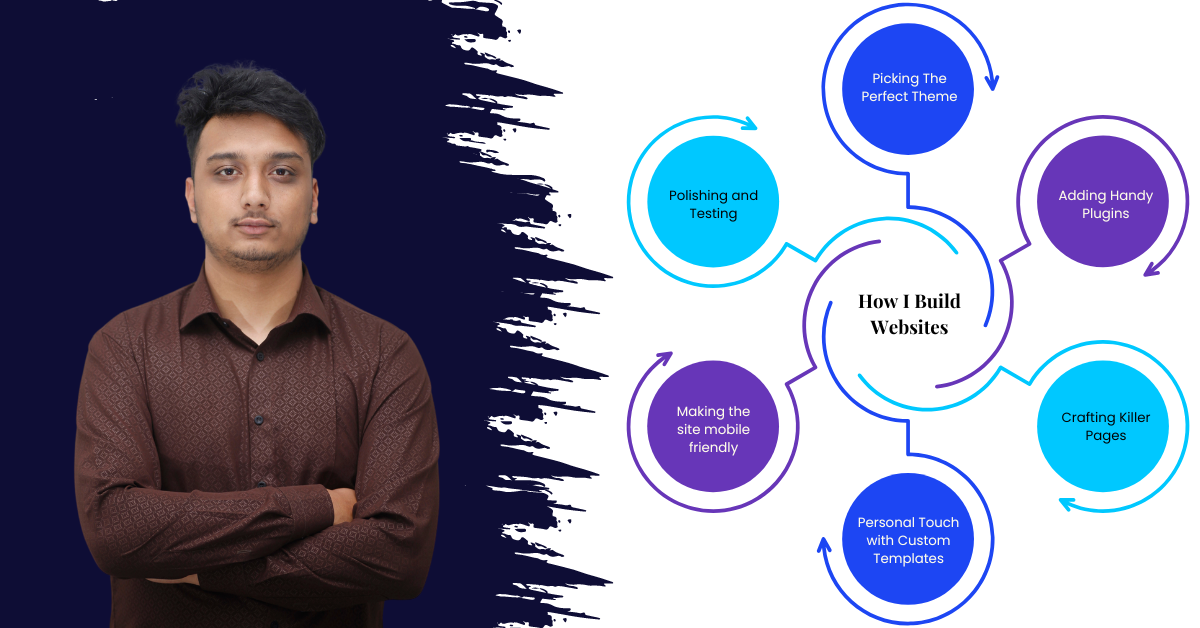
    Hello, I’m Utsav Acharya Sharma, and I’m here to take you on a journey through my process of crafting awesome websites. At Majestic Technology, I’m the guy who brings digital dreams to life, using a mix of WordPress, HTML, CSS, JavaScript, and PHP. So, buckle up as I spill the beans on how I make it all happen!

    1) Introduction

    2) How I build websites

    a. Picking the perfect theme

    b. Adding Handy Plugins

    c. Crafting Killer Pages

    d. Personal Touch with Custom Templates

    e. Making it mobile friendly

    f. Polishing and Testing

    3) Conclusion

    Let’s start with a quick intro. I’m all about building websites that not only look great but also perform like a charm. My weapon of choice? WordPress, of course! But I don’t stop there. I sprinkle in some HTML, CSS, JavaScript, and PHP to add that extra oomph. At Majestic Technology, I’ve had the pleasure of working on some exciting projects, turning ideas into stunning online realities.

    It all begins with choosing the right theme. I spend hours scouring through options, making sure it not only looks good but also loads fast and meets the client’s needs. After all, a slow website is a big no-no in today’s fast-paced world.

    Plugins are like little helpers that make a website shine. Whether it’s boosting SEO or beefing up security, I handpick plugins tailored to each project. It’s all about finding that sweet spot between features and performance.

    Here’s where the fun begins! Using tools like Elementor, I bring designs to life, pixel by pixel. Every element, every section is carefully placed to create a seamless user experience. It’s all about making sure visitors stick around and explore what the site has to offer.

    No cookie-cutter websites here! I dive deep into custom templates, headers, and footers, injecting each with personality and functionality. It’s all about making sure the website reflects the brand’s unique vibe.

    In today’s world, your website needs to look good on any device. That’s why I spend time tweaking and optimizing for all screen sizes. Whether you’re on a phone, tablet, or desktop, the experience remains top-notch.

    Before I hit that “publish” button, I run through a rigorous checklist. From optimizing performance to squashing pesky bugs, I leave no stone unturned. Because let’s face it, nobody likes a website that’s slow or glitchy.

    And there you have it – my website building journey in a nutshell! From concept to execution, I pour my heart and soul into every project. It’s all about creating digital experiences that wow and delight. So, if you ever need a website that not only looks good but also performs like a champ, you know who to call. Here’s to many more digital adventures ahead!