Tag: #Blogs

  • Securing Your WordPress Site: A Comprehensive Guide

    Securing Your WordPress Site: A Comprehensive Guide

    Table of Contents

    1. Introduction
    2. Why Security Matters
    3. Essential Security Best Practices
    1. Secure Your Hosting and Database
    1. Backup and Monitor Your Site
    2. Use SSL Encryption
    3. Final Thoughts

    Introduction

    With the changing face of cyber threats, securing your WordPress site has now become a need in this digital landscape. There are millions of sites running on WordPress, which is why it’s common for hackers and malware developers to target them. It can end in data theft, financial loss, and massive reputation damage that is sometimes impossible to make up for. Security is important for either a personal blog or a large e-commerce store. This guide walks you through the best security practices for your WordPress site, such as choosing a good hosting provider, installing security plugins, and working on SSL encryption. Following such steps will allow minimizing vulnerabilities, protecting data, and allowing users to have a safe experience.

    Why Security Matters

    With over 40% of all websites running on WordPress, it has obviously become a prime target for most hackers. Breaches can be anything from stealing personal information to taking down your site and can literally wreak havoc on your financial and reputation standing. However, some measures taken can ensure you prevent such threats.

    Essential Security Best Practices

    a. Use Strong Passwords and Two-Factor Authentication

    A weak password is one of the easiest ways for hackers to gain access. Ensure that you and your users are using strong, complex passwords that are difficult to guess. Consider adding two-factor authentication (2FA) for an additional layer of security. With 2FA, even if someone obtains your password, they’ll need another form of verification to log in.

    b. Regularly Update WordPress and Plugins

    Outdated WordPress versions, themes, and plugins are one of the most common sources of security vulnerabilities. Regular updates ensure that any known bugs or loopholes are patched up. Enable automatic updates when possible to minimize risks.

    c. Install Security Plugins

    There are numerous security plugins designed to help monitor and protect your site. Plugins like Wordfence, iThemes Security, or Sucuri offer a range of features including malware scanning, firewall protection, and login attempt monitoring. Installing and properly configuring one of these plugins is a must for any WordPress site owner.

    Secure Your Hosting and Database

    a. Choose a Secure Hosting Provider

    The security of your hosting provider plays a major role in your site’s safety. Opt for a reputable provider that offers strong security features, such as automatic updates, backups, and protection against Distributed Denial of Service (DDoS) attacks. Ensure your hosting plan includes SSL support to encrypt data transmissions.

    b. Protect Your Database with Backups and Prefix Changes

    Your WordPress database contains crucial information, and it’s vital to safeguard it. Regularly backup your database, either manually or using a plugin, so that you can restore it in the event of an attack. Additionally, change the default “wp_” database prefix to something unique, as this makes it harder for hackers to execute SQL injection attacks.

    Backup and Monitor Your Site

    Regular backups are essential to quickly recover from a security breach or system failure. Plugins like UpdraftPlus and BackupBuddy allow you to automate this process, ensuring your backups are always up to date. Additionally, monitoring your site for unusual activity, such as frequent login attempts or sudden spikes in traffic, can help you identify threats early and take swift action.

    Use SSL Encryption

    Implementing SSL encryption (HTTPS) is essential for securing data exchanged between your site and visitors. Not only does it protect sensitive information like login details or payment data, but it also boosts your site’s trustworthiness in the eyes of users and search engines. Most hosting providers offer free SSL certificates through Let’s Encrypt, so there’s no reason to skip this step.

    Final Thoughts

    Website security is not a one-time task but an ongoing process. By applying the strategies outlined in this guide using strong passwords, installing security plugins, keeping your site updated, and securing your database you can significantly reduce the risk of a security breach. Remember to stay proactive and keep an eye on the latest security trends to ensure your WordPress site remains safe.
  • Why WordPress is the Go-To Platform for Developers and Designers

    Why WordPress is the Go-To Platform for Developers and Designers

    Table of Contents:

    1. Introduction
    2. Flexibility and Customization
    3. Extensive Plugin Ecosystem
    4. Open-Source Nature
    5. Responsive and Mobile-Friendly Design
    6. SEO Capabilities
    7. Strong Community Support
    8. Scalability
    9. Security Features
    10. Easy Content Management

    1. Introduction

    WordPress has solidified its position as the most popular content management system (CMS) in the world, powering over 40% of all websites. This blog will explore the key reasons why WordPress is the go-to platform for developers and designers, highlighting the features and benefits that make it the preferred choice for creating everything from simple blogs to complex websites.

    2. Flexibility and Customization

    WordPress offers unmatched flexibility, allowing developers and designers to create a wide variety of websites. Whether it’s a personal blog, a corporate site, or an e-commerce platform, WordPress can be customized to meet specific needs. With access to thousands of themes and the ability to create custom designs, designers can craft unique, visually appealing websites. Developers can leverage the platform’s robust API to create custom functionality, making WordPress adaptable to any project.

    3. Extensive Plugin Ecosystem

    One of the standout features of WordPress is its extensive plugin ecosystem. With over 55,000 plugins available, developers can easily extend the functionality of a WordPress site without writing complex code from scratch. These plugins cover everything from SEO optimization and security enhancements to social media integration and e-commerce capabilities, allowing developers to add advanced features to their sites quickly and efficiently.

    4. Open-Source Nature

    WordPress is an open-source platform, meaning its source code is freely available for anyone to use, modify, and distribute. This openness encourages innovation and collaboration within the developer community, leading to continuous improvements and the creation of a vast array of themes, plugins, and tools. For developers, this means complete control over their projects and the ability to tailor WordPress to their specific needs.

    5. Responsive and Mobile-Friendly Design

    In today’s digital landscape, having a responsive website is essential. WordPress makes it easy to create mobile-friendly designs with its vast selection of responsive themes and design tools. This ensures that websites built on WordPress look great on all devices, from desktops to smartphones. For designers, this responsiveness is crucial for delivering a seamless user experience across different platforms.

    6. SEO Capabilities

    Search engine optimization (SEO) is a critical aspect of any website’s success. WordPress is renowned for its SEO-friendly architecture, which helps websites rank higher in search engine results. Plugins like Yoast SEO further enhance WordPress’s SEO capabilities, providing developers with tools to optimize content, meta tags, and other SEO elements easily. This focus on SEO makes WordPress an attractive choice for businesses looking to improve their online visibility.

    7. Strong Community Support

    WordPress has a large and active community of developers, designers, and users who contribute to its growth and development. This community-driven support is a significant advantage for developers and designers, providing access to a wealth of resources, including forums, tutorials, and documentation. Whether you’re troubleshooting an issue or seeking inspiration, the WordPress community is always ready to help.

    8. Scalability

    WordPress is a highly scalable platform, capable of supporting websites of all sizes. Whether you’re starting with a small blog or planning to build a large e-commerce site, WordPress can scale with your needs. This scalability is a key reason why developers choose WordPress for projects that may grow over time, as it allows them to add new features and handle increased traffic without compromising performance.

    9. Security Features

    Security is a top concern for any website, and WordPress takes it seriously. The platform regularly releases updates to address security vulnerabilities and improve overall security. Additionally, there are numerous security plugins available that provide extra layers of protection, such as firewalls, malware scanners, and login protection. For developers, these security features are essential for building and maintaining secure websites.

    10. Easy Content Management

    WordPress is known for its user-friendly interface, which makes content management a breeze. Designers appreciate this ease of use because it allows their clients to manage and update their content without needing technical assistance. The intuitive dashboard, combined with features like the Gutenberg block editor, empowers users to create and edit content with ease, making WordPress a practical choice for non-technical users as well.


    Conclusion

    WordPress’s flexibility, extensive plugin ecosystem, open-source nature, and strong community support make it the go-to platform for developers and designers. Its ability to create responsive, SEO-friendly, and secure websites, combined with its scalability and ease of content management, ensures that WordPress remains the top choice for professionals in the web development and design industry. Whether you’re building a small blog or a complex e-commerce site, WordPress offers the tools and resources needed to bring any project to life.

  • How WordPress Empowers Small Businesses to Thrive Online

    How WordPress Empowers Small Businesses to Thrive Online

    Table Of Content

    1. Introduction
    2. Cost-Effective Solution
    3. User-Friendly Interface
    4. Customizability and Flexibility
    5. SEO-Friendly Features
    6. Responsive Design
    7. Scalability
    8. Strong Community Support
    9. Content Management System (CMS)
    10. Security Features
    11. Conclusion

    Introduction

    In today’s digital age, having a robust online presence is crucial for small businesses aiming to reach a broader audience and grow their customer base. WordPress, a versatile and user-friendly platform, has emerged as a powerful tool for small businesses to build and maintain their online presence. Here’s how WordPress empowers small businesses to thrive online

    Cost-Effective Solution

    Starting a business often comes with budget constraints. WordPress offers a cost-effective solution for creating and maintaining a professional website. The platform itself is free, and there are numerous free themes and plugins available. Even premium options are generally affordable compared to custom website development.

    User-Friendly Interface

    Intuitive Dashboard: Easy-to-navigate dashboard for managing content, settings, and updates without technical expertise.
    Simplified Content Management: Drag-and-drop functionality and WYSIWYG (What You See Is What You Get) editor make content creation and editing straightforward.
    Accessible for Non-Techies: No coding skills required small business owners can efficiently handle their site’s day-to-day operations.

    Customizability and Flexibility

    Themes and Templates: Wide range of themes to choose from, allowing businesses to select or customize a design that reflects their brand identity.
    Plugins for Enhanced Functionality: Thousands of plugins available to add features such as contact forms, e-commerce options, and social media integration.
    Tailored Solutions: Ability to modify themes and plugins to meet specific business needs and preferences, ensuring a unique and functional website.

    SEO-Friendly Features

    Built-In SEO Best Practices: WordPress core is designed with SEO in mind, including clean URLs and structured data.
    SEO Plugins: Tools like Yoast SEO help optimize on-page elements such as meta tags, keywords, and readability for better search engine rankings.
    Content Management for SEO: Easy management of content and updates, which is crucial for maintaining and improving SEO performance over time.

    Responsive Design

    In an era where mobile internet usage surpasses desktop, having a mobile-friendly website is essential. Most WordPress themes are designed to be responsive, ensuring that websites look and function well on all devices, including smartphones and tablets.

    Scalability

    As a small business grows, so do its needs. WordPress is highly scalable, allowing businesses to start with a simple website and gradually add more features and functionalities as they expand. Whether adding a blog, an online store, or a booking system, WordPress can accommodate growing requirements seamlessly.

    Strong Community Support

    One of WordPress’s greatest strengths is its vibrant community. The platform has a large and active user base, including developers, designers, and enthusiasts who contribute to forums, create tutorials, and develop plugins and themes. This community support ensures that small businesses can always find help and resources when needed.

    Content Management System (CMS)

    At its core, WordPress is a powerful content management system (CMS) that makes it easy for businesses to publish and manage content. Regularly updating content is crucial for engaging visitors and improving SEO rankings, and WordPress simplifies this process with its user-friendly editor and media management tools.

    Security Features

    Security is a top concern for any online business. WordPress offers various security plugins and features to protect websites from threats and vulnerabilities. Regular updates and a proactive approach to security help ensure that small business websites remain safe and secure.

    Conclusion

    WordPress has revolutionized the way small businesses create and manage their online presence. Its cost-effectiveness, user-friendliness, customizability, and robust features make it an ideal platform for businesses looking to thrive in the digital landscape. By leveraging the power of WordPress, small businesses can build professional, scalable, and secure websites that attract and retain customers, driving growth and success.

  •  How we built Reporters Club America Website

     How we built Reporters Club America Website

    Table of Content

    1) Introduction

    2) Development Process

       i) Planning and Requirement Analysis

       ii) Design and Prototype

       iii) Development

       iv) Integrating Plugins

       v) Testing

       vi) Deployment and Launch

    3) Conclusion

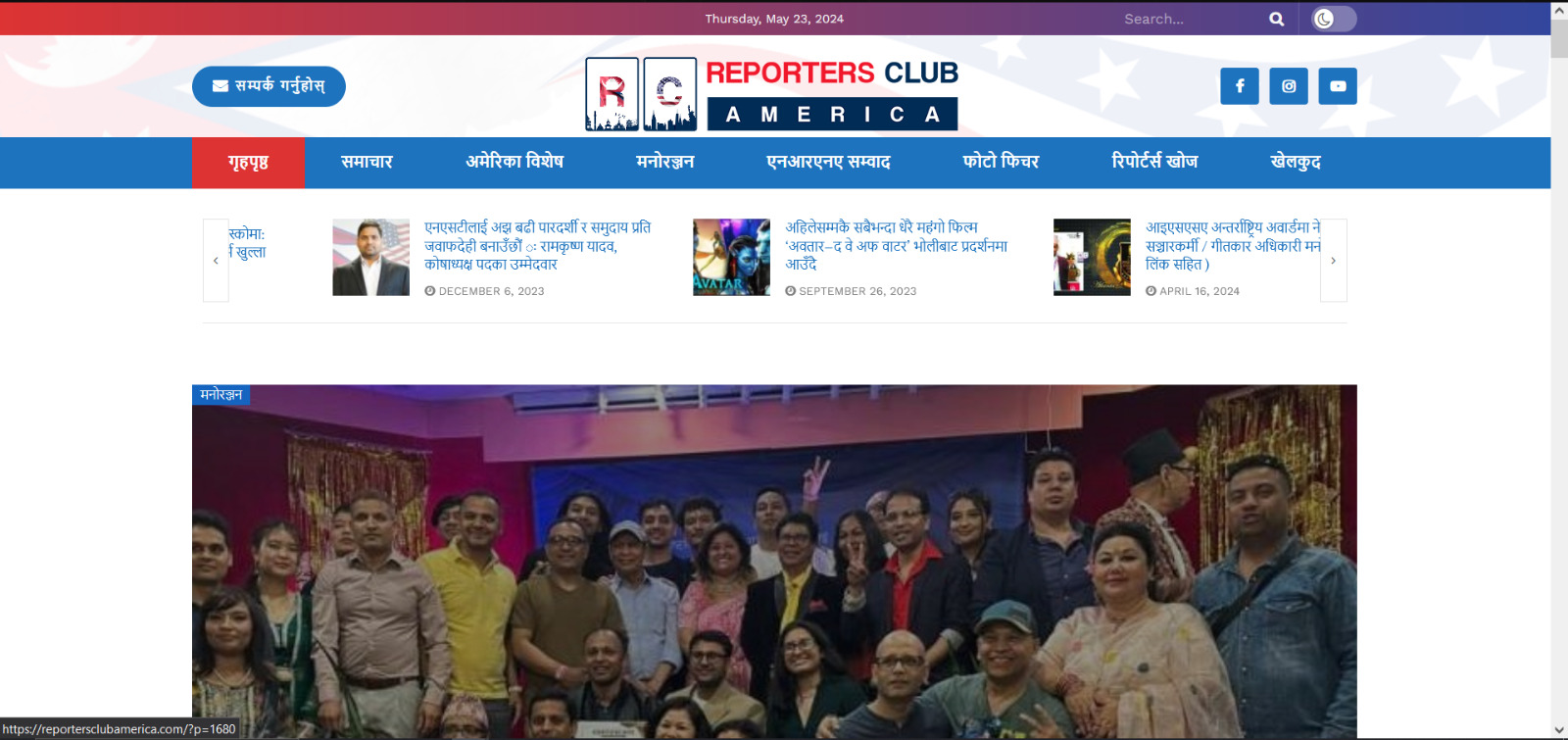
    Reporters Club America is an official platform that showcases news articles and blogs focusing on Nepal. Our goal was to create a website that is not only visually appealing but also functional and user-friendly. Utilizing WordPress and a range of plugins, we aimed to build a site that provides a seamless experience for readers and contributors alike.

    Our first step was to sit down with the Reporters Club America team to understand their vision and requirements for the website. Key objectives included:

    -A clean, professional design that reflects the journalistic integrity of the organization.

    -Easy navigation to access news articles, blogs, and categories.

    -Integration of SEO tools to enhance visibility.

    -Features for user engagement, including contact forms.

    With a clear understanding of the requirements, our design team began creating wireframes and prototypes. Using tools like Sketch and Adobe XD, we developed mockups that outlined the site’s layout and design. Key design elements included:

    -A homepage featuring the latest news and blog posts.

    -A categorized menu for easy navigation.

    -Responsive design to ensure compatibility with all devices.

    -Clean typography and a professional color scheme to enhance readability.

    Once the design was finalized, we moved on to the development phase. We chose WordPress for its flexibility and ease of use. The key development steps included:

    -Setting up a WordPress environment and installing the necessary plugins.

    -Customizing the JNews theme to match our design.

    -Creating custom post types for news articles and blogs.

    -Ensuring the site is mobile-friendly and fast-loading.

    To enhance the functionality and user experience of the website, we integrated several essential plugins:

    -JNews Theme: This theme was perfect for our needs, offering a range of features and customization options ideal for a news and blog site.

    -All in One SEO: To optimize the site for search engines, we used this powerful SEO plugin.

    -Contact Form 7: This plugin allowed us to create a user-friendly contact form for inquiries and feedback.

    -MC4WP: Mailchimp for WordPress: We integrated this plugin to manage newsletter sign-ups and email marketing.

    -Popup Box: Used for displaying popups for special announcements and promotions.

    -The Post Grid: This plugin enabled us to display posts in a grid layout, enhancing the visual appeal and organization of the content.

    Before launching, we conducted extensive testing to ensure everything worked perfectly. This involved:

    -Functionality Testing: Verifying that all features, including forms and popups, worked as intended.

    -Compatibility Testing: Ensuring the site performed well across various browsers and devices.

    -Performance Testing: Using tools like GTmetrix and Google PageSpeed Insights to optimize loading times and overall performance.

    -User Testing: Gathering feedback from a select group of users to identify and fix any usability issues.

    With testing complete, we moved on to the deployment phase. Key steps included:

    -Setting up the live hosting environment.

    -Migrating the website from the development environment to the live server.

    -Conducting a final round of testing on the live site.

    -Officially launching the site with announcements on Reporters Club America’s social media channels.

    Building the Reporters Club America website was a fulfilling project that combined creativity and technical skills. By leveraging WordPress and a suite of powerful plugins, we created a professional, user-friendly platform for news and blogs related to Nepal. We hope this walkthrough provides valuable insights into our development process and serves as inspiration for others embarking on similar projects.

    Visit Reporters Club America Website: https://reportersclubamerica.com