WordPress has always been a dynamic platform, continuously evolving to meet the needs of its vast user base. The latest major update, WordPress 6.6, is no exception, bringing a sack of new features and improvements designed to enhance creativity, usability, and efficiency. Whether you’re a casual blogger or a seasoned developer, there’s something in this update for everyone. Let’s dive into what’s new in WordPress 6.6 and how it can benefit your site.
Table of Content
2) Streamlined Site Editor Experience
4) Custom Content with Synced Patterns
7) Enhanced Block Bindings API
The Basics
WordPress 6.6 is already rolling out on WordPress.com, and many of you might have already seen these new features in action. For those running their own WordPress installations, this update will soon be available. Remember, if you encounter any issues, WordPress.com’s expert Happiness Engineers are just a message away.

Streamlined Site Editor Experience
The Site Editor has undergone a significant overhaul in recent releases, and WordPress 6.6 takes this further by introducing a more intuitive side-by-side layout for editing pages. This new view improves navigation, making it easier to manage and edit your content. The integration of pattern management is also smoother, reducing the number of clicks needed to access your desired tools and settings. Additionally, enhancements in keyboard navigation and bulk editing actions contribute to a more efficient workflow.
Unified Publishing Flow
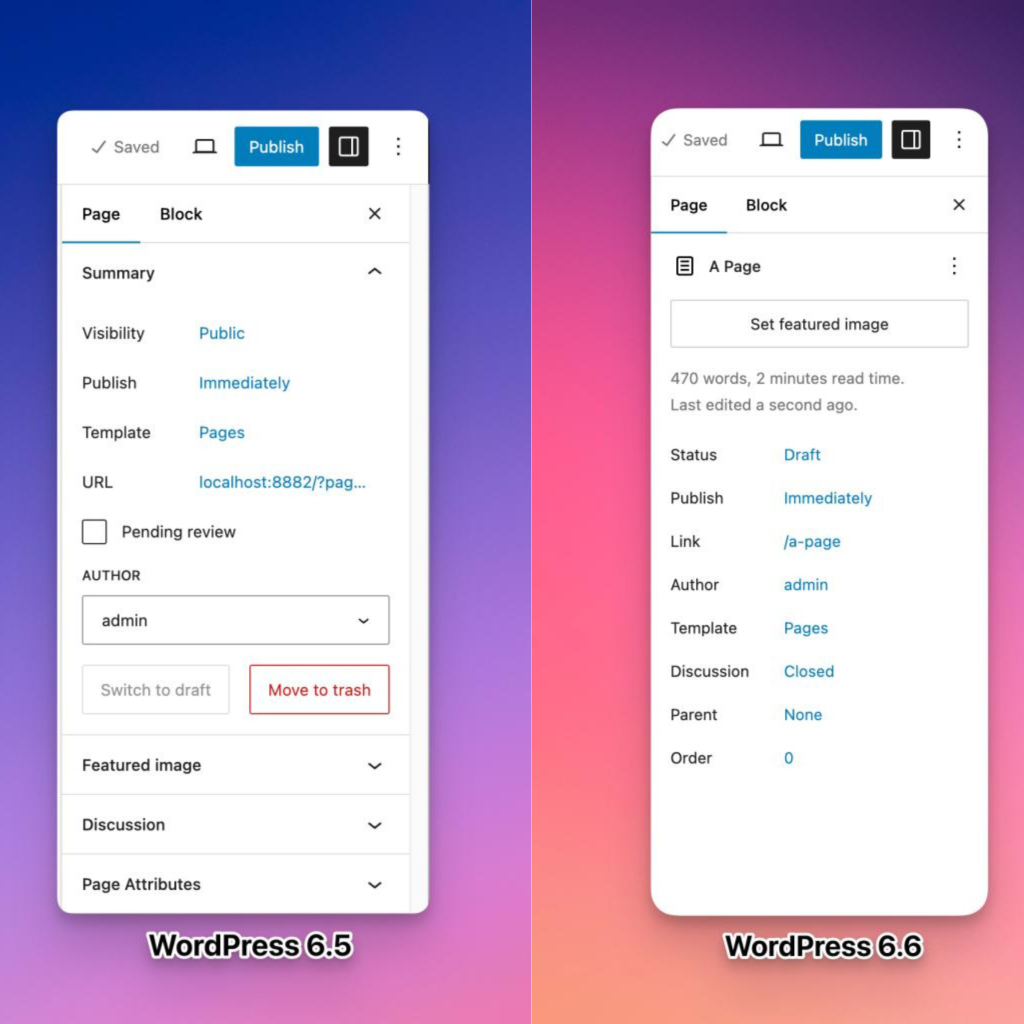
Gone are the days of juggling between different interfaces for publishing posts and managing site content. WordPress 6.6 unifies the publishing flow, making interactions between different site elements much smoother. The updated layout now features more prominent displays for titles, publishing status, and featured images. For developers, this means an easier process for extending the editor, as both the post/page editor and Site Editor now share the same extensibility APIs. This not only streamlines development but also opens the door for more plugins to enhance your editing experience.
Custom Content with Synced Patterns
One of the most exciting new features is the ability to override synced patterns with custom content. This means you can now modify specific blocks within a pattern, such as changing the text or colors of a button CTA, while keeping the overall design consistent. You can enable these overrides from the “Advanced” section of various blocks like Paragraph, Heading, Buttons, and Image, with plans to expand this feature in the future.
Automatic Plugin Rollbacks
Plugin management just got a lot more reliable with automatic rollbacks. Previously, a failed plugin update could leave your site broken or parts of it non-functional. With WordPress 6.6, if an update fails, the plugin will automatically revert to its previous version, ensuring your site remains operational while you troubleshoot the issue.
New Design Elements
WordPress 6.6 introduces several new customization options to help you craft a visually appealing site:
- Site Background Image: You can now set a site-wide background image with customizable size, position, and repetition options, allowing for a more personalized visual impact.
- Negative Margins: For more precise design control, you can now set negative margins for any block. This feature facilitates overlapping elements and creative layouts, though negative values must be entered manually.
- Grid Support: The new Grid and Grid Layout blocks let you create professional-looking grids for various types of content. The “Auto” option ensures responsive design, while the “Manual” option offers detailed control over rows and columns.
- Custom Shadow Styles: From the Styles menu, you can now edit and create custom shadow styles for images, buttons, and more, giving you greater flexibility in your design.
- Section-Specific Styles: Theme developers will appreciate the ability to define style variations for specific site sections, such as headers or footers. This feature requires editing the theme’s theme.json file but provides a powerful way to customize different parts of your site.
Enhanced Block Bindings API
The Block Bindings API, introduced in WordPress 6.5, has been upgraded for greater ease of use. This API allows you to connect the content of a block to custom field data. In WordPress 6.6, you can now update custom field data directly from the block editor, streamlining content management and making it easier to maintain data consistency across your site.
Conclusion
WordPress 6.6 is packed with features that enhance usability, creativity, and efficiency. Whether you’re looking to simplify your editing process, customize your site’s design, or ensure the reliability of your plugins, this update offers valuable tools and improvements. As always, keep an eye on the WordPress blog for more updates and tips, and happy WordPressing!